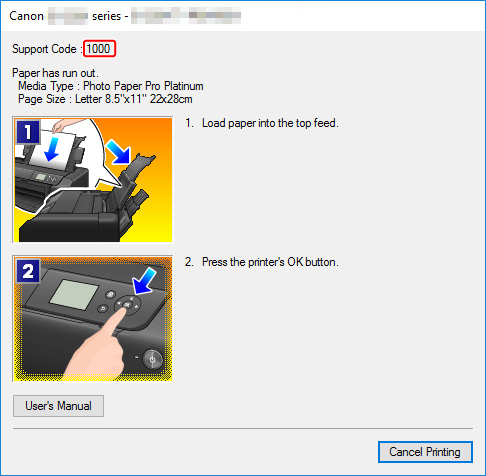
Для плоттеров Canon imagePROGRAF iPF670, iPF605, iPF770, iPF750, iPF710, iPF650, iPF700, iPF785, iPF610, iPF765, iPF680, iPF760, iPF510, iPF780, iPF600, iPF500, iPF685, iPF720, iPF670e, iPF671, iPF671.
| Code | Diagnosis | Что значит |
| 0181xxxx-xxxx | Ink warning | Некритичная ошибка чернил |
| 0180xxxx-xxxx | Printhead warning | Некритичная ошибка печатающей головки |
| 0184xxxx-xxxx | Maintenance cartridge warning | Некритичная ошибка картриджа |
| 0134xxxx-xxxx | GARO warning | Некритичная ошибка растрового драйвера |
| 0303xxxx-xxxx | Cover error | Ошибка крышки принтера |
| 0301xxxx-xxxx 0306xxxx-xxxx 0386xxxx-xxxx | Media error | Ошибки загрузки носителя (например, бумаги) |
| 0313xxxx-xxxx | Sensors, fans, motors error | Ошибки датчиков, моторов и вентиляторов |
| 0380xxxx-xxxx | Printhead error | Ошибки печатающей головки |
| 0381xxxx-xxxx 0383xxxx-xxxx | Ink error | Ошибки чернил |
| 0384xxxx-xxxx | Maintenance cartridge error | Ошибки картриджа отработки |
| 0387xxxx-xxxx | Cutter unit error | Ошибки резака |
| 0389xxxx-xxxx | Media take-up unit error | Ошибки устройства приёма носителя |
| 0390xxxx-xxxx | Firmware error | Ошибки прошивки |
| Exxx-xxxx | Service call error | Ошибки сервисного режима |
Общие ошибки
| Сообщение на экране | Код ошибки | Проблема | Способ устранения проблемы |
| Ink Level: Check | 0180104-1000 | BK ink tank near-empty | Renew the ink tanks. |
| Ink Level: Check | 0180101-1001 | Y ink tank near-empty | |
| Ink Level: Check | 0180102-1002 | M ink tank near-empty | |
| Ink Level: Check | 0180103-1003 | C ink tank near-empty | |
| Ink Level: Check | 0180106-1006 | MBK ink tank near-empty | |
| Ink Level: Check | 0180106-1007 | MBK2 ink tank near-empty | |
| Problem with Printhead. Check printing results | 01800500-1010 | Number of non-discharging nozzles in printhead: Warning level | Clean the printheads. Renew the printheads. Identify the head management sensor unit. |
| Prepare for maint cart replacement. | 01841001-281A | Maintenance cartridge near-full | Replace the maintenance cartridge. |
| Prepare for parts replacement. Call for service. | Parts counter W1 level | Check the parts counter in service mode. | |
| Parts replacement time has passed. Call for service. | Parts counter W2 level | After checking the parts counter in service mode, replace any part whose counter is nearing the error value. | |
| GARO W1221 | 01341221-1030 | GARO (image mode): Unknown command | Verify the transmitted data before reprinting. |
| GARO W1222 | 01341222-1031 | GARO (image mode): Invalid parameter count (no parameters) | |
| GARO W1223 | 01341223-1032 | GARO (image mode): Required parameter missing | |
| GARO W1225 | 01341225-1034 | GARO (image mode): Other warning | |
| GARO W1226 | 01341226-103A | GARO (image mode): Image processing table error | |
| GARO W1231 | 01341231-1035 | GARO (setup): Unknown command | |
| GARO W1232 | 01341232-1036 | GARO (setup): Invalid parameter count | |
| GARO W1233 | 01341233-1037 | GARO (setup): Required parameter missing | |
| GARO W1234 | 01341234-1038 | GARO (setup): Data out of bounds | |
| GARO W1235 | 01341235-1039 | GARO (setup): Other warning | |
| End of paper feed. Cannot feed paper more. | Forced feed limit | Check the remaining quantity of roll media. | |
| This type of paper is not compatible with HP-GL/2. | 01860006-1015 | Non-support paper of HP-GL/2 | Exchange for the compatible paper to HP-GL/2. |
| GL2:W0501 The memory is full. | 01340501-1040 | Memory full (HP-GL/2) | Check if there is the non-image area of the print. Verify the transmitted data before reprinting. |
| GL2:W0904 The memory is full. | 01340904-1048 | Overflow of Polygon buffer (HP-GL/2) | |
| GL2:W0903 The memory is full. | 01340903-1047 | Overflow of replot buffer (HP-GL/2) | |
| GL2:W0502 The parameter is out of range. | 01340502-1041 | Invalid parameter (HP-GL/2) | Verify the transmitted data before reprinting. |
| GL2:W0504 This command is not supported. | 01340504-1043 | Invalid command (HP-GL/2) | |
| Mail box nearly full. Delete unwanted data | 011A1001-2901 | The free hard disk space left for Personal Boxes in the printer’s hard disk does not have more than 1 GB, combined. | Delete unneeded jobs stored in Personal Boxes. |
| Mail box full. Now printing without saving data. | 01861003-2902 | 100 jobs are stored in the Personal Box. | Delete unneeded jobs stored in Personal Boxs. |
| Not much ink is left. Prepare to replace the ink. | 01810103-1003 | C ink tank near-empty | Renew the C ink tank. |
| Not much ink is left. Prepare to replace the ink. | 01810102-1002 | M ink tank near-empty | Renew the M ink tank. |
| Not much ink is left. Prepare to replace the ink. | 01810101-1001 | Y ink tank near-empty | Renew the Y ink tank. |
| Not much ink is left. Prepare to replace the ink. | 01810106-1006 | MBK ink tank near-empty | Renew the MBK ink tank. |
| Not much ink is left. Prepare to replace the ink. | 01810104-1000 | BK ink tank near-empty | Renew the BK ink tank. |
| Ink tank is empty. Replace the ink tank. | 01810303-1403 | C ink tank empty | Renew the C ink tank. |
| Ink tank is empty. Replace the ink tank. | 01810302-1402 | M ink tank empty | Renew the M ink tank. |
| Ink tank is empty. Replace the ink tank. | 01810301-1401 | Y ink tank empty | Renew the Y ink tank. |
| Ink tank is empty. Replace the ink tank. | 01810306-1406 | MBK ink tank empty | Renew the MBK ink tank. |
| Ink tank is empty. Replace the ink tank. | 01810304-1400 | BK ink tank empty | Renew the BK ink tank. |
| No ink tank loaded. Check ink tank. | 01810103-1413 | C ink tank removal | Attach the C ink tank. |
| No ink tank loaded. Check ink tank. | 01810102-1412 | M ink tank removal | Attach the M ink tank. |
| No ink tank loaded. Check ink tank. | 01810101-1411 | Y ink tank removal | Attach the Y ink tank. |
| No ink tank loaded. Check ink tank. | 01810106-1416 | MBK ink tank removal | Attach the MBK ink tank. |
| No ink tank loaded. Check ink tank. | 01810104-1410 | BK ink tank removal | Attach the BK ink tank. |
| The paper is too small. | 013200D2-1051 | Size clip error | Check the media size check. Change the media size. |
| Maximum jobs stored. Delete unwanted data. | 011A1006-2907 | Saved jobs exceed the Personal Box capacity. | Press the stop button to cancel the print job. Delete print jobs from the queue. Delete unneeded jobs stored on the hard disk. |
| PHead needs cleaning. Press Online to clear error. | 03800500-280C | Printhead found to have many non-discharging nozzles during a non-discharging inspection (printing paused) | Clean the printhead. Identify the nozzles in a nozzle check pattern. Replace the printhead. |
| Paper size not detected. Lift the release lever and reload the paper. | 03010000-200C | Unable to detect the leading end of paper | Check the leading end of paper. Reload the paper. |
| Leading edge detection error. Lift the release lever and align leading edge with orange line. | 03010000-200D | Unable to detect the trailing end of cut sheet | Check the sheet length. Check to see if paper has not jammed. |
| Paper size not detected. Lift the release lever and reload the paper. | 03010000-2017 | Paper (right) edge detection error | Check the right edge of paper. Check the paper type. |
| Paper size not detected. Lift the release lever and reload the paper. | 03010000-2018 | Paper (left) edge detection error | Check the left edge of paper. Check the paper type. |
| Cannot adjust printhead. Press Online to clear the error and readjust printhead. | 03863000-2820 | Printhead registration unadjustable | Check the paper on which a pattern is printed for smears. Check the environment for interferences from outside light. Clean the printhead. |
| Cannot adjust printhead. Press Online to clear the error and readjust printhead. | 03863000-2821 | LF unadjustable | Check the paper on which a pattern is printed for smears. Check the environment for interferences from outside light. Clean the printhead. |
| Cannot print as specified. Lift the release lever and replace paper with A4/ LTR (vertical) or larger. | 03010000-2E1F | Undersized paper loaded for internal printing (A4 or larger) | Replace with A4/Letter or any larger-sized paper. |
| Cannot print as specified. Lift the release lever and replace paper with A3/ Ledger (vertical) or larger. | 03010000-2E1F | Undersized paper loaded for internal printing (A3 or larger) | Replace with A3/11″x17″ or any larger-sized paper. |
| Cannot print as specified. Lift the release lever and replace roll with 10 in. wide or larger roll. | 03010000-2E1F | Undersized paper loaded for internal printing (roll media) | Replace with roll media at least 10 inches in width. |
| Cannot detect paper Remove paper and press Load/Eject. | 03010000-2E25 | Paper jam while feeding/ejecting/printing | Remove the paper jam and reload the paper. |
| Cannot feed paper Lift the release lever and reload paper. | 03010000-2E27 | Paper jam during feeding/printing/ejection | Reload the paper. |
| This paper cannot be used. Check supported paper sizes. | 03010000-200E | Undersized paper (cut sheets/roll media) | Replace with larger-sized paper. |
| This paper cannot be used. Check supported paper sizes. | 03010000-200F | Oversized paper (cut sheets/roll media) | Replace with smaller-sized paper. |
| Use another paper. Press Online to clear the error. | 03010000-2F33 | Unadjustable because of transparent media | Replace with adjustable media. |
| Paper loaded askew. Lift the release lever. | 03016000-2010 | Skew | Correct the skew in the paper and reload it. |
| Paper size not detected. Reload paper. | 03010000-200A | Unable to detect the paper width (Paper loaded at an improper position) | Reload the paper |
| Paper jam. Press Load/Eject and reload the paper. | 03010000-2E27 | Paper jam during feeding/printing/ejection | Reload the paper |
| Paper size not detected. Lift the release lever and reload the paper. | 03010000-200C | Roll media loading size detection failure | Reload the roll media. |
| Cannot adjust eccentric. Press Online to clear the error. | 03863000-2822 | Eccentricity correction disabled | Check to see if paper has not jammed. |
| Sheet printing is selected. Press Load/Eject and load sheets. | 03860002-2E02 | Data with a cut sheet specification has been received but no cut sheets are loaded. | Load cut sheets at the paper tray port. |
| Roll printing is selected, but sheets are loaded. Press OK, remove the sheets, and load a roll. | 03860002-2E0A | Data with a roll media specification has been received when a cut sheet tray is loaded. | Replace with roll media. |
| Roll printing is selected. Press Load/Eject and load a roll. | 03060A00-2E00 | Data with a roll media specification has been received but no roll media are loaded. | Load roll media. |
| No Roll Feed Unit. Turn printer off and install roll feed unit. | 03060A00-2E0E | Roll media unit not installed | Install the roll media unit. |
| The roll is empty. Lift the release lever and replace the roll. | 03060A00-2E1B | Roll media end | Renew the supply of roll media. |
| Wrong paper feed slot for this paper type. Press Load/Eject and reload the paper. | 03061000-2E15 | Paper type mismatch | Check the type of paper that can be fed and reload the paper. |
| Manual printing is selected, but a roll is loaded. Press Load/Eject and remove the roll. | 03860001-2E0C | Data with a cut sheet specification has been received when roll media are loaded. | Load cut sheets at the paper tray port. |
| Hardware error. 03130031-2E23 Turn off printer, wait, then turn on again. | 03130031-2E23 | Cutter unit failure | Check the cutter unit. |
| Hardware error. 03130031-2E14 Turn off printer, wait, then turn on again. | 03130031-2F14 | Writing to the ASIC register disabled | Replace the main controller PCB |
| Hardware error. 03130031-2E16 Turn off printer, wait, then turn on again. | 03130031-2F16 | Mist fan error | Check the mist fan. |
| Hardware error. 03130031-2E17 Turn off printer, wait, then turn on again. | 03130031-2F17 | Suction fan lock detection error | Check the suction fan. |
| Hardware error. 03130031-2E20 Turn off printer, wait, then turn on again. | 03130031-2F20 | Purge motor cam position error | Check the purge unit. |
| Hardware error. 03130031-2E22 Turn off printer, wait, then turn on again. | 03130031-2F22 | Pump travel timeout | Check the purge unit. |
| Hardware error. 03130031-2E23 Turn off printer, wait, then turn on again. | 03130031-2F23 | Purge motor error Pump inoperable | Check the purge unit. |
| Hardware error. 03130031-2E25 Turn off printer, wait, then turn on again. | 03130031-2F25 | Unable to detect the carriage motor home position | Check the carriage unit. Check the linear encoder for smears. |
| Hardware error. 03130031-2E26 Turn off printer, wait, then turn on again. | 03130031-2F26 | Carriage inoperable | Check the carriage unit and surrounding parts. |
| Hardware error. 03130031-2E27 Turn off printer, wait, then turn on again. | 03130031-2F27 | Carriage travel timeout | Check the carriage unit and surrounding parts. |
| Hardware error. 03130031-2E1F Turn off printer, wait, then turn on again. | 03130031-2F1F | Pump cam sensor error | Check the purge unit. |
| Hardware error. 03130031-2E2A Turn off printer, wait, then turn on again. | 03130031-2F2A | Unable to detect the feed roller home position | Check the feed roller encoder and surrounding part. Check to see if paper has not jammed. |
| Hardware error. 03130031-2E29 Turn off printer, wait, then turn on again. | 03010000-2F29 | Feed motor timeout (Roll media) | Check the roll feed unit. Check roll media. Check to see if paper has not jammed in the printer. |
| Hardware error. 03130031-2E2E Turn off printer, wait, then turn on again. | 03130031-2F2E | Roll travel timeout | Check the roll feed unit. |
| Hardware error. 03130031-4027 Turn off printer, wait, then turn on again. | 03130031-4027 | Lift travel timeout error | Check the carriage unit and surrounding parts. |
| Hardware error. 03130031-2E13 Turn off printer, wait, then turn on again. | 03130031-2F13 | A/D converter external trigger output stop detection hardware error 1 | Replace the new printhead. |
| Hardware error. 03130031-2F32 Turn off printer, wait, then turn on again. | 03130031-2F32 | Multi sensor error | Check the environment for interferences from outside light. Replace the multi sensor unit. |
| Hardware error. 03130031-2F3A Turn off printer, wait, then turn on again. | 03130031-2F3A | Valve motor error | Check the ink supply unit. |
| Hardware error. 03130031-2F3B Turn off printer, wait, then turn on again. | 03130031-2F3B | CS communication error | Remove the ink tanks and then reload them. Check the main controller PCB. |
| Hardware error. 03130031-260E Turn off printer, wait, then turn on again. | 03130031-260E | Gap detection error | Check the carriage unit and surrounding parts. Replace the main controller PCB. |
| Hardware error. 03130031-2618 Turn off printer, wait, then turn on again. | 03130031-2618 | VH voltage error | Check the power supply unit. |
| Hardware error. 03130031-260F Turn off printer, wait, then turn on again. | 03130031-260F | Gap reference surface error | Replace the reference surface sheet. |
| Roll feed unit error Turn off printer and check roll feed unit | 03060B00-2E24 | Roll feed unit failure | Replace the roll feed unit. |
| Unknown file. Check file format. Turn off printer, wait a while, then turn it on again. | 03900001-4049 | ROM data for another model has been transferred. | Transmit valid ROM data. |
| Unknown file. Check file format. Turn off printer, wait a while, then turn it on again. | 03900001-4042 | MIT data transfer failure | Verify the validity of MID data before transferring it. |
| Hardware error. 03130031-2F2B Turn off printer, wait, then turn on again. | 03130031-2F2B | LF operation failure | Check to see if paper has not jammed. Check the feed motor and feed roller. |
| Printhead error Open top cover and replace the printhead. | 03800200-2802 | Invalid printhead installed | Replace printhead |
| Printhead error Open top cover and replace the right printhead. | 03800300-2801 | Printhead DI compensation failure | Replace printhead |
| Printhead error Open top cover and replace the right printhead. | 03800400-2803 | Printhead EEPROM error | Replace printhead |
| Hardware error. 03800500-2F2F Turn off printer, wait, then turn on again. | 03800500-2F2F | Non-discharging error | Identify the head management sensor unit Replace the head management sensor unit Replace the printhead |
| Hardware error. 03800500-2F30 Turn off printer, wait, then turn on again. | 03800500-2F30 | Non-discharging position adjustment error | Identify the head management sensor unit Replace the head management sensor unit Replace the printhead |
| Ink tank is empty. Press OK and replace ink tank. | 03810104-2500 | Bk ink tank empty | Renew the Bk ink tank |
| Ink tank is empty. Press OK and replace ink tank. | 03810101-2501 | Y ink tank empty | Renew the Y ink tank |
| Ink tank is empty. Press OK and replace ink tank. | 03810102-2502 | M ink tank empty | Renew the M ink tank |
| Ink tank is empty. Press OK and replace ink tank. | 03810103-2503 | C ink tank empty | Renew the C ink tank |
| Ink tank is empty. Press OK and replace ink tank. | 03810106-2506 | MBk ink tank empty | Renew the MBk ink tank |
| Ink tank is empty. Press OK and replace ink tank. | 03810106-2507 | MBk2 ink tank empty | Renew the MBk ink tank |
| Ink insufficient. Press OK and replace ink tank. | 03810204-2580 | Low on the Bk ink tank (as during cleaning) | Replace with a fully replenished Bk ink tank |
| Ink insufficient. Press OK and replace ink tank. | 03810201-2581 | Low on the Y ink tank (as during cleaning) | Replace with a fully replenished Y ink tank |
| Ink insufficient. Press OK and replace ink tank. | 03810202-2582 | Low on the M ink tank (as during cleaning) | Replace with a fully replenished M ink tank |
| Ink insufficient. Press OK and replace ink tank. | 03810203-2583 | Low on the C ink tank (as during cleaning) | Replace with a fully replenished C ink tank |
| Ink insufficient. Press OK and replace ink tank. | 03810206-2586 | Low on the MBk ink tank (as during cleaning) | Replace with a fully replenished MBk ink tank |
| Ink insufficient. Press OK and replace ink tank. | 03810204-2590 | Low on the Bk ink tank (during pre-printing checks) | Replace with a fully replenished Bk ink tank |
| Ink insufficient. Press OK and replace ink tank. | 03810201-2591 | Low on the Y ink tank (during pre-printing checks) | Replace with a fully replenished Y ink tank |
| Ink insufficient. Press OK and replace ink tank. | 03810202-2592 | Low on the M ink tank (during pre-printing checks) | Replace with a fully replenished M ink tank |
| Ink insufficient. Press OK and replace ink tank. | 03810203-2593 | Low on the C ink tank (during pre-printing checks) | Replace with a fully replenished C ink tank |
| Ink insufficient. Press OK and replace ink tank. | 03810206-2596 | Low on the MBk ink tank (during pre-printing checks) | Replace with a fully replenished MBk ink tank |
| Ink tank error. Press OK and replace ink tank. | 03830204-2540 | Bk ink tank ID error | Replace with a valid Bk ink tank |
| Ink tank error. Press OK and replace ink tank. | 03830201-2541 | Y ink tank ID error | Replace with a valid Y ink tank |
| Ink tank error. Press OK and replace ink tank. | 03830202-2542 | M ink tank ID error | Replace with a valid M ink tank |
| Ink tank error. Press OK and replace ink tank. | 03830203-2543 | C ink tank ID error | Replace with a valid C ink tank |
| Ink tank error. Press OK and replace ink tank. | 03830206-2546 | MBk ink tank ID error | Replace with a valid MBk ink tank |
| Ink tank error. Press OK and replace ink tank. | 03830206-2547 | MBk2 ink tank ID error | Replace with a valid MBk ink tank |
| No ink tank loaded. Press OK and check ink tank. | 03830104-2520 | BK ink tank not installed | Install a Bk ink tank |
| No ink tank loaded. Press OK and check ink tank. | 03830101-2521 | Y ink tank not installed | Install a Y ink tank |
| No ink tank loaded. Press OK and check ink tank. | 03830102-2522 | M ink tank not installed | Install a M ink tank |
| No ink tank loaded. Press OK and check ink tank. | 03830103-2523 | C ink tank not installed | Install a C ink tank |
| No ink tank loaded. Press OK and check ink tank. | 03830106-2526 | MBK ink tank not installed | Install a MBk ink tank |
| No ink tank loaded. Press OK and check ink tank. | 03830106-2527 | MBK2 ink tank not installed | Install a MBk ink tank |
| Top cover is open. Turn off printer, wait a while, and turn it on again. | 03031000-2F38 | Top cover abnormally open | Close the top cover and turn on the printer again. |
| Ink tank cover is open. Turn off printer, wait a while, and turn it on again. | 03031000-2E10 | Ink tank cover abnormally open | Close the ink tank cover and turn on the printer again. |
| Maintenance cartridge full. Replace the maintenance cartridge. | 03841001-2819 | Maintenance cartridge full | Renew the maintenance cartridge. |
| No Maintenance Cartridge capacity. Replace the maintenance cartridge. | 03841001-281B | Not enough space in the maintenance cartridge prior to cleaning | Replace the maintenance cartridge. |
| Maintenance cartridge problem. Replace the maintenance cartridge. | 03841201-2816 | Maintenance cartridge EEPROM error | Renew the maintenance cartridge. |
| Maintenance cartridge problem. Replace the maintenance cartridge. | 03841201-2817 | Maintenance cartridge ID error | Renew the maintenance cartridge. |
| Borderless printng not possible. Check roll position. Online: Print Load/Eject: Change Paper | 03861001-2405 | Paper loaded at a position inaccessible for borderless printing | Check to see if a borderless printing spacer is installed. Reload the paper. |
| Borderless printng not possible. Check paper size setting. Online: Print Load/Eject: Change Paper | 03861001-2406 | Data unfit for borderless printing | Check the paper size. Change the paper size. |
| Insufficient paper for job Online: Print Stop: Stop Printing Load/Eject: Change Paper | 03862000-2E09 | Not enough roll media on remaining roll media quantity detection | Renew the supply of roll media. |
| Cannot cut paper. Lift the release lever and reload the paper. | 03870001-2015 | Cutting failure | Cut paper manually. Check the cutter. |
| Cannot adjust optic axis. Press Online to clear the error. | 03863000-2824 | Optical axis error | Check the multi sensor. Check the head management sensor. |
| This type of paper is not compatible with HP-GL/ 2. Online: Print Stop: Stop Printing Load/Eject: Change Paper | 03061000-2E15 | Non-support media of HP-GL/2 | Exchange for the compatible paper to HP-GL/2 before reprinting. |
| Mail box full. Delete unwanted data on your computer to resume printing. Press Stop to cancel printing. | 031A1001-2905 | The job store executed when the free hard disk space left for Personal Boxes in the printer’s hard disk is full. | Delete unneeded jobs stored in Personal Boxes. |
| Mail box full. Cannot save. Delete unwanted data on your computer to resume printing. Press Stop to cancel printing. | 031A1006-2906 | The store executed when 32 jobs are stored in the Personal Box. | Delete unneeded jobs stored in Personal Boxes. |
| Hard disk error. Press OK to reformat | 031A1002-2908 | Hard disk format error | Press the [OK] button to start reformatting the hard disk. When formatting is finished, the printer automatically restarts. |
| File read error. Turn off printer, wait a while, and turn it on again. Invalid files will be deleted. | 031A1002-2909 | Hard disk file error | Restart the printer. Only the corrupted files will be deleted, and the printer will restart. |
| Hardware error. 03800500-2F31 Turn off printer, wait, then turn on again. | 03800500-2F31 | Non-discharge detection optical axis error | Check the head management sensor. Replace the head management sensor. Replace the printhead. |
| Hardware error. 03130031-2F3C Turn off printer, wait, then turn on again. | 03130031-2F3C | LF pressure error | Check the pinch roller and surrounding part. Replace the pinch roller pressure drive unit. |
| No printhead Install printhead. | 03800100-2800 | Printhead not installed | Install the printhead. |
| Wrong printhead. Open top cover and replace the printhead. | 03800200-2811 | Printhead version error | Replace the printhead. |
| No maintenance cartridge. Check the maintenance cartridge. | 03841101-2818 | Mauntenance cartridge not installed | Install the maintenance cartridge. |
| This type of media is not compatible with HP-GL/ 2. | 03860006-2825 | Paper type mismatch at HP-GL/2 printing | Exchange for the compatible paper to HP-GL/2 before reprinting. |
| Cannot cut paper. Lift the release lever and reload the paper. | 03870001-2019 | Cut failure (during jam occure) | Check the cutter unit and surrounding part. Replace the cutter. |
| Insufficient paper for job | 03862001-2E31 | Not enough roll media | Renew the supply of roll media. |
| Paper jam. Manually rewind roll all the way and press OK. | 03010000-2E3A | Madia load failure | Check the pick-up unit and roll media. Check to see if paper has not jammed. |
| Sheet printing is selected. Press Load/Eject and load sheets. | 03060100-2E02 | Cut sheet in not set | Load cut sheets at the paper tray port. |
| Borderless printng not possible. Check supported paper. | 03861001-2408 | Borderless printing disabled (unsupported size) | Check the media size. Change the media size. |
| Borderless printng not possible. Paper stretched or shrank. Confirm usage cond. of the paper. | 03861001-2407 | Borderless printing disabled (engine detection) | Reload the paper. |
| Roll printing is selected. Press Load/Eject and load a roll. | 03060A00-2E35 | Roll media is not loaded for internal printing. | Reload the roll media. |
Ошибки сервисного режима
| Code | Description | Action |
| E141-4046 | Number of recovery rotations reaching 50,000 or more | Replace the purge kit, and then clear the parts counter in the service mode. |
| E146-4001 | Borderless/flow idle ejection/mist recovery count error | Replace the waste ink tank unit or mist fan or waste ink absorber or multi sensor reference, and then clear the parts counter in the service mode. |
| E161-403E | Abnormal temperature rise in printhead | Replace the printhead. |
| E194-404A | Non-discharging nozzle count error | Replace the head management sensor unit, and then clear the parts counter in the service mode. |
| E196-4040 | Checksum error | Replace the main controller PCB. |
| E196-4041 | Flash memory erase error | Replace the main controller PCB. |
| E196-4042 | Flash memory write error | Replace the main controller PCB. |
| E196-4045 | EEPROM write error | Replace the main controller PCB. |
| E196-404C | Serial number mismatch between boards | Execute PCB replacement mode or replace the main controller PCB. |
| E196-404D | Machine ID mismatch between boards | Replace the main controller PCB. |
| E196-404E | EEPROM read error | Replace the main controller PCB. |
| E198-401C | RTC error | Replace the lithium battery or replace the main controller PCB. |
| E198-401D | RTC low battery error | Replace the lithium battery or replace the main controller PCB. |
| E198-401E | RTC clock stop | Replace the lithium battery or replace the main controller PCB. |
| E199-404B | Temperature/humidity sensor board connector out of position | Check the temperature/humidity sensor board connector or replace the board. |
| E602-401A | HDD failure | Replace the HDD unit. |
| E602-401B | HDD connection error | Check the HDD connector/Replace the HDD unit. |
| E144-4047 | Number of carrriage scan operation is full | Replace the tube unit, and then clear the parts counter in the service mode. |
| E144-4048 | Printhead ink filling failure | Replace the printhead. |
| E196-4043 | Memory error | Execute firmware update or replace the main controller PCB. |
| E196-4044 | Firmware size error | Execute firmware update or replace the main controller PCB. |